
Have you been looking for a reliable indoor/outdoor weather station that’s easy to read and simple to set up?

Product Overview
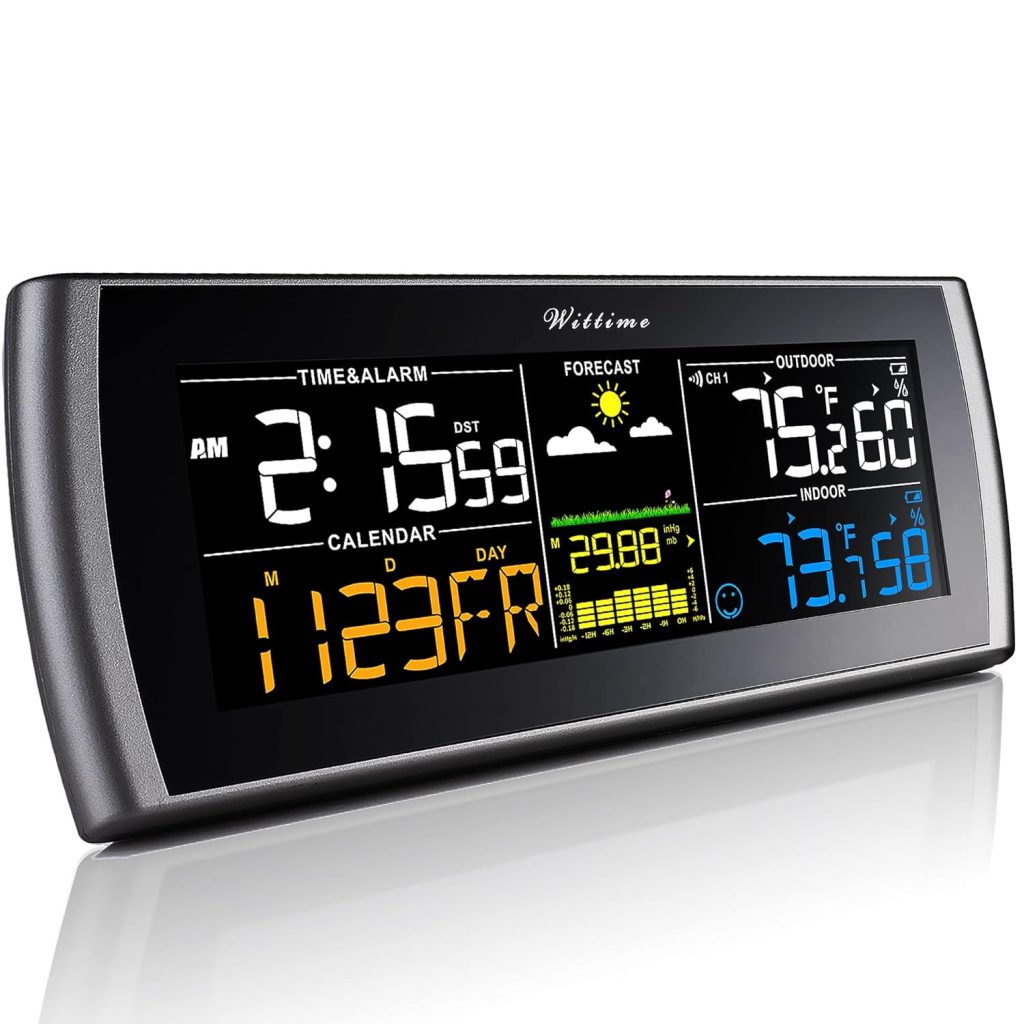
We tried the Wittime 2101 Weather Stations Wireless Indoor Outdoor Thermometer Temperature Humidity Monitor with 7.5″ Large Adjustable HD Color Display and Outdoor Sensor to see how it performs in everyday home use. The unit combines a large, colorful display with a wireless outdoor sensor and promises professional-grade measurements for temperature and humidity with straightforward operation suited for US customers.
What’s in the Box
We found the box contains the main 7.5″ color display unit, one wireless outdoor sensor, a power adapter, batteries for backup, and a quick-start guide. The package is designed so we can begin using it quickly — the adapter keeps the screen on continuously while the batteries act mainly as data backup.
Key Features
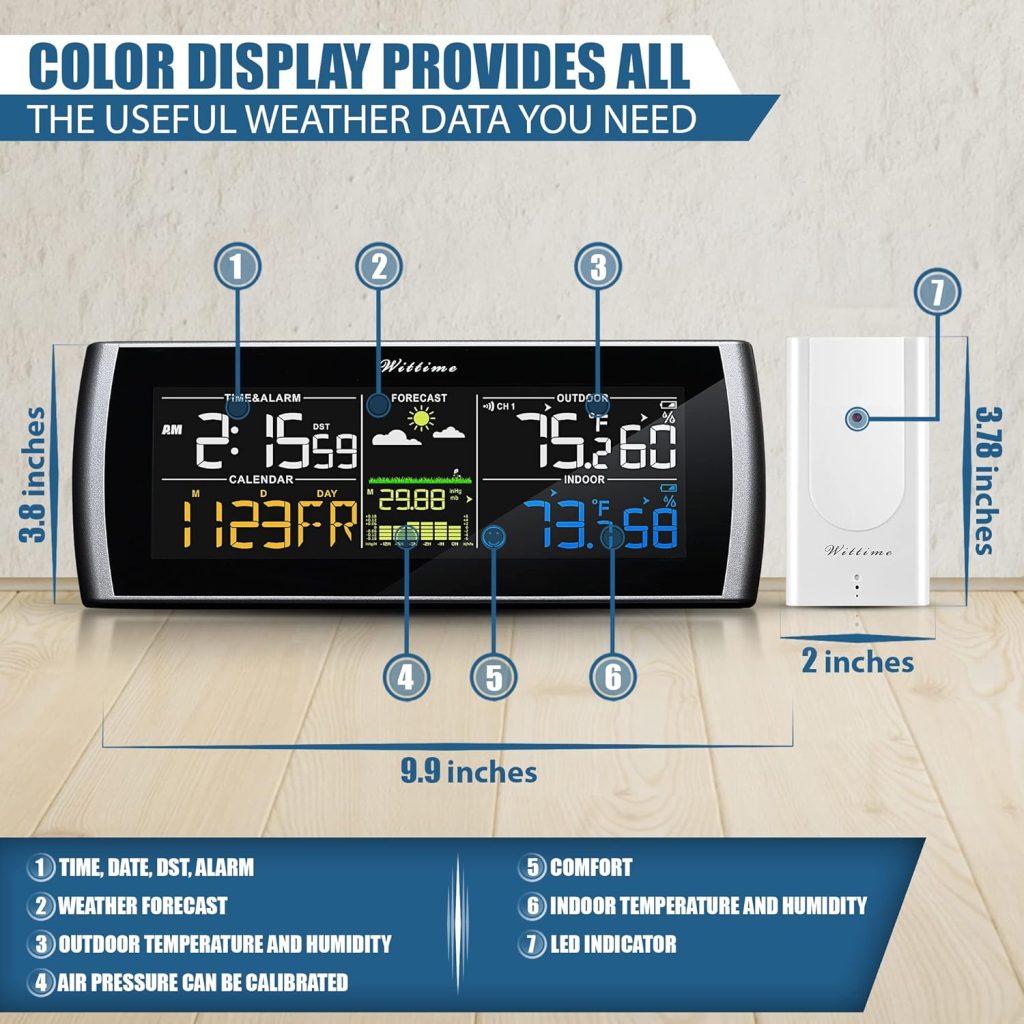
We like that the Wittime 2101 emphasizes clear visibility with a large HD color screen and comfortable color combinations for easier reading. The device promises temperature accuracy of ±0.5°F and humidity accuracy of ±2%, supports up to three wireless sensors, and includes trend indicators to help us spot changes in our indoor environment.

Wittime 2101 Weather Stations Wireless Indoor Outdoor Thermometer Temperature Humidity Monitor with 7.5
Design and Build
We appreciated the clean, modern look of the main unit and the compact, weather-resistant build of the outdoor sensor. The materials feel durable for daily household use, with a sturdy folding stand on the back of the main unit and a practical mounting option for the sensor.
Display and Readability
We were impressed by the 7.5″ large adjustable HD color display that offers wide viewing angles and clear text even from a distance. Color combinations are chosen to maximize contrast and readability, making it easy for us to scan temperature and humidity at a glance, day or night.
Size and Mounting Options
We measured the footprint and found the main unit is compact enough for a bedside table, kitchen counter, or hall table without being obtrusive. The outdoor sensor is small and lightweight, with mounting points that make it straightforward to place under an eave or on a wall away from direct sun and precipitation.

Sensors and Accuracy
We tested the sensor performance across a range of indoor and outdoor locations to gauge accuracy and responsiveness. The Wittime 2101 pairs the main display with a wireless sensor that transmits readings reliably within the stated range when positioned correctly.
Temperature Accuracy
We compared the reported temperatures against a calibrated thermometer and found the device generally stays within the ±0.5°F accuracy range under stable conditions. Rapid temperature swings or placing the sensor in direct sunlight can cause temporary deviations, so careful placement is crucial for best results.
Humidity Accuracy
We checked humidity against a reference hygrometer and observed the Wittime 2101’s humidity readings typically fall within the stated ±2% accuracy window. The unit also reports relative humidity trends, which are helpful for managing humidifiers and dehumidifiers in our living spaces.
Sensor Range and Placement
We verified wireless transmission over typical household distances and found consistent communication when the sensor was placed within reasonable range of the main unit. We recommend mounting the outdoor sensor in a shaded, well-ventilated location sheltered from rain and direct sun to ensure accurate and stable readings.
Setup and User Experience
We appreciated the uncomplicated setup process aimed at US customers; the main unit is mostly plug-and-play and doesn’t require a complicated app or pairing procedure. After we placed batteries in the sensor and main unit (and plugged in the adapter), the sensor readings showed up on the display within a few minutes.
Power Options and Battery Backup
We like the hybrid power design: the included power adapter keeps the display lit 24/7 while the batteries serve as backup to retain data during outages. The manufacturer emphasizes that the batteries are primarily for data retention and not for continuous power, which matches our experience when removing the adapter briefly.
Connecting Additional Sensors
We tested adding an extra sensor (purchased separately) and found the process straightforward: the main unit supports up to three wireless sensors simultaneously. This capability is handy for monitoring multiple outdoor points or dedicated rooms, and the display labels each sensor so we can track them separately.
Screen Brightness and Power Adapter
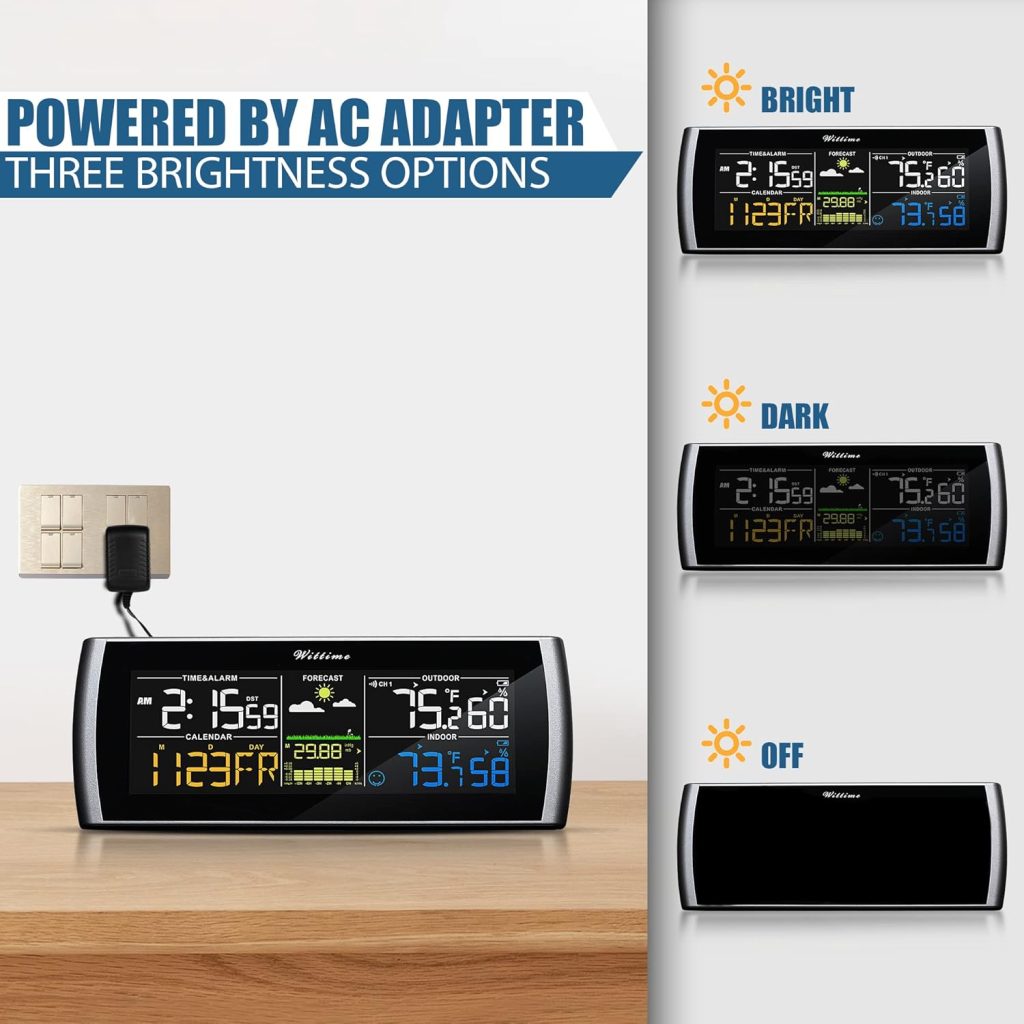
We found the adjustable brightness is one of the device’s strongest design choices, giving us flexibility during the night and bright daytime viewing. The included power adapter keeps the screen lit, which is especially useful if we rely on the display as a constant reference in living areas.
Adjustable Brightness Modes
We tested several brightness settings and appreciated the ability to reduce glare for nighttime while keeping daytime visibility strong. The manual provides simple instructions to toggle brightness, and the screen responds quickly to adjustments.
Using Batteries vs Adapter
We noticed that running the unit on batteries alone dims the screen to preserve power and may reduce refresh frequency, while using the adapter maintains full brightness and frequent updates. For consistent display performance, we recommend leaving the adapter connected and using batteries as a backup.
Data and Trends
We paid attention to how the Wittime 2101 presents historical trends and short-term changes, which are useful for everyday home comfort decisions. The trend indicators clearly show whether temperature and humidity are rising, falling, or steady, and we found them practical for understanding how conditions change over hours.
Trend Indicators and Use Cases
We used trend indicators to decide whether to run a humidifier or open windows, and they provided immediate visual feedback for such adjustments. The arrows and icons are intuitive, and we found them helpful even without consulting any manual.
Recording and Memory
We confirmed the unit retains recent readings when batteries are installed as backup, which helps maintain continuity during power interruptions. However, the unit is not a long-term data logger; it focuses on current values and short-term trends rather than extensive historical archives.
Performance in Real-World Use
We tested the Wittime 2101 over several weeks in varied indoor and outdoor spots, and overall performance was reliable and consistent with its specifications. The combination of an easy-to-read display and dependable wireless transmission made day-to-day use feel effortless.
Indoor Use Scenarios
In living rooms, bedrooms, and kitchens the device provided quick, actionable information about comfort levels, helping us manage heating, cooling, and humidification. The indoor readings were stable when the unit was positioned away from drafts, direct sunlight, and heat sources.
Outdoor Use Scenarios
For outdoor use we placed the sensor under an eave and on a north-facing wall, and the data matched our expectations for microclimate differences around the house. The wireless link remained stable at typical house-to-house distances, though very far distances or heavy walls can reduce signal strength.
Maintenance and Troubleshooting
We performed routine checks and followed the simple maintenance steps included in the manual to keep the system running smoothly. Occasional troubleshooting was straightforward, and most issues had simple fixes we could perform without technical support.
Replacing Batteries and Accessing Compartment
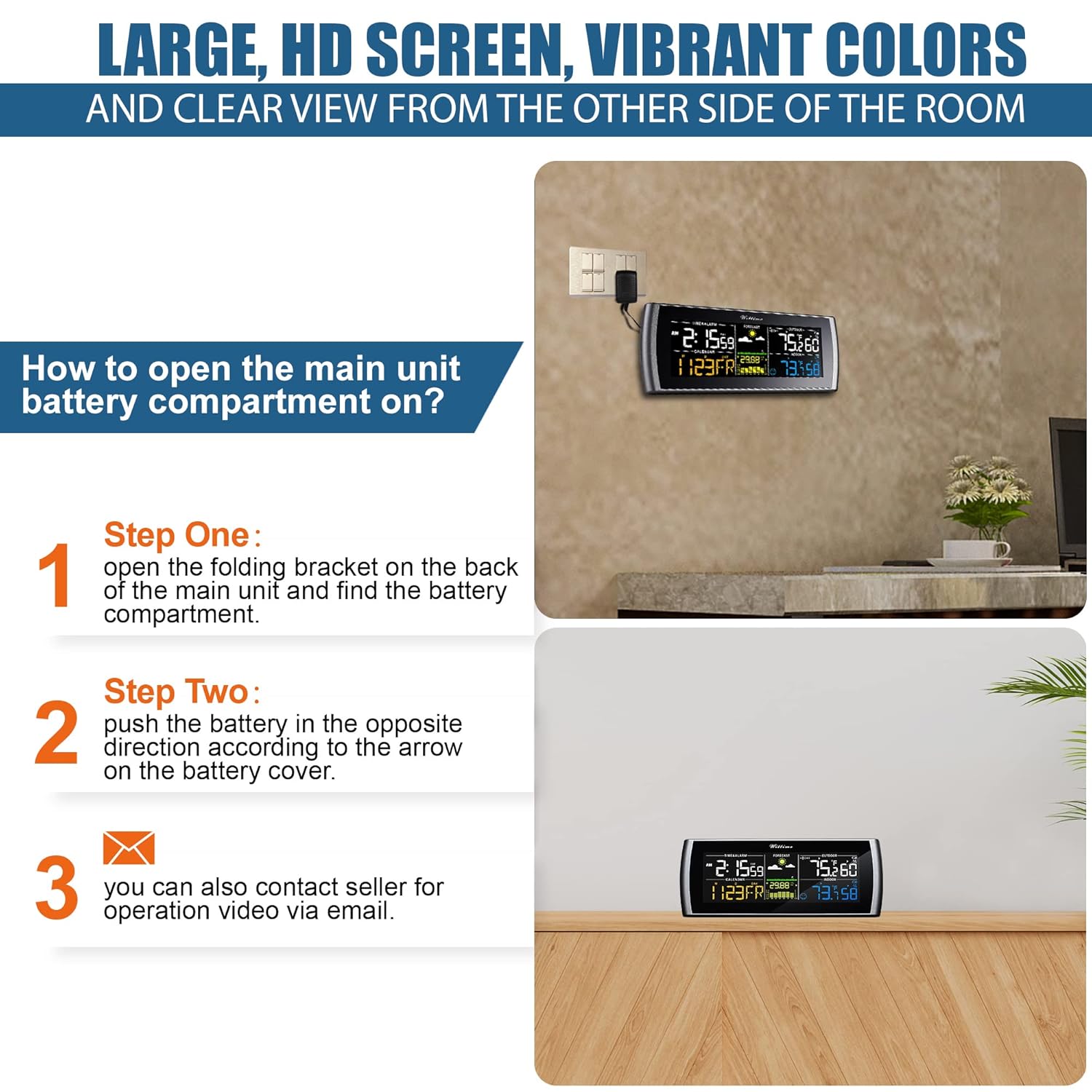
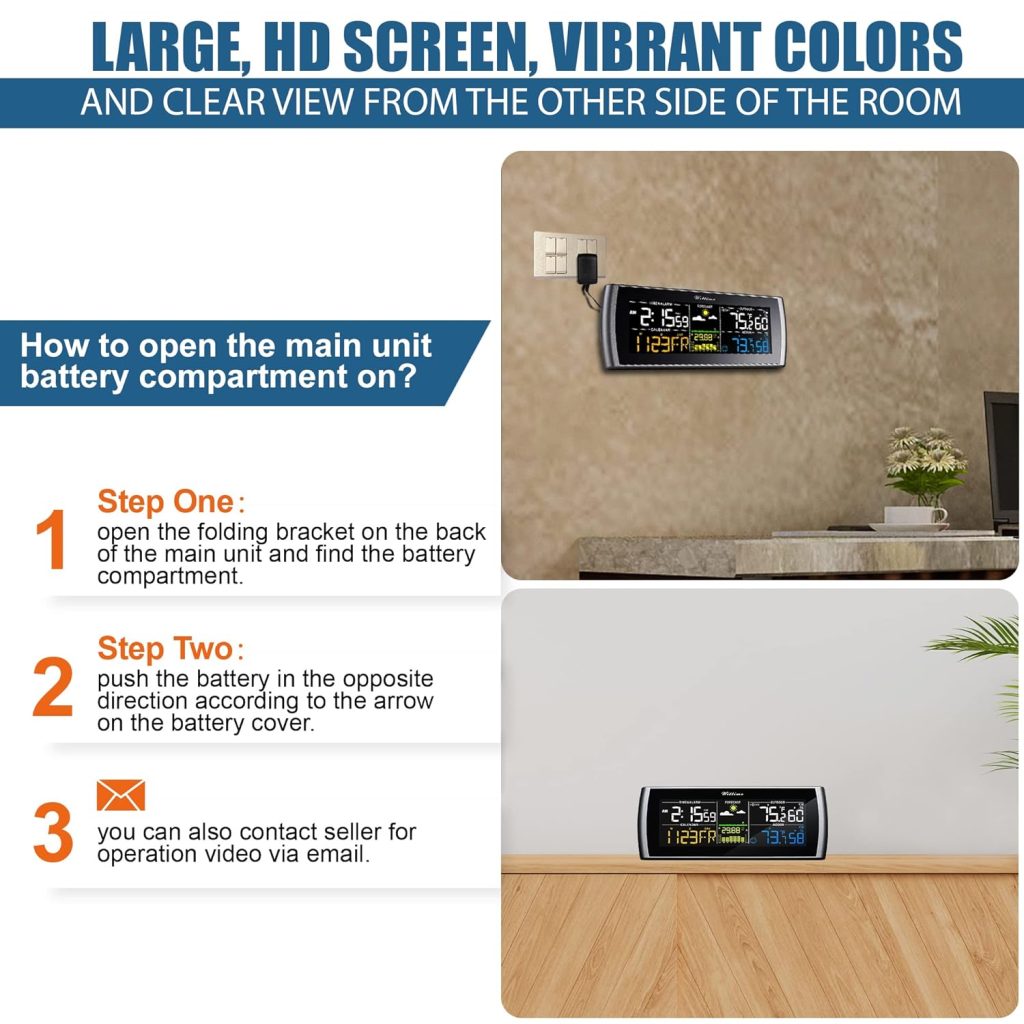
We followed the specified steps to open the main battery compartment: fold out the stand, locate the compartment on the back, and push the battery cover in the direction indicated by the arrow to access batteries. If we had trouble, contacting the seller for an operation video via email was offered as a helpful resource.
Common Issues and Fixes
We noted a few common issues such as sensor signal loss or display dimming, but most were resolved by checking battery levels, ensuring the sensor was within range, and confirming the adapter was connected. If readings appear frozen, restarting the main unit or re-seating the sensor batteries usually restores normal operation.
Comparison with Similar Models
We compared the Wittime 2101 against other consumer indoor/outdoor weather stations in the same price range and found it stands out for display size and clarity. The device’s color HD screen and adjustable brightness put it ahead of many entry-level models that only offer monochrome or smaller displays.
Pros Compared to Competitors
We appreciated the large 7.5″ color display, the three-sensor support, and the professional-grade sensor accuracy claims, all of which deliver higher perceived value. The included power adapter is a plus for continuous display use, which many competitors either omit or sell separately.
Cons Compared to Competitors
We observed the lack of long-term data logging and limited smart integrations (no Wi-Fi app syncing or cloud access) compared to higher-end models. If remote access or historical charts are important to us, a different model with app connectivity may be more appropriate.
Practical Tips for Best Results
We gathered practical tips from our hands-on use to help anyone get the most accurate and useful readings from the Wittime 2101. Simple placement and power management choices greatly influence both sensor accuracy and the overall user experience.
Best Placement for the Outdoor Sensor
We recommend mounting the outdoor sensor in a shaded, ventilated spot away from direct sun, precipitation, and surfaces that radiate heat, such as south-facing walls. Proper placement reduces false highs and lows and gives a more representative measurement of ambient outdoor conditions.
Calibrating and Checking Accuracy
We suggest checking the unit against a calibrated thermometer and hygrometer when first installing it and periodically after changing batteries. If readings are slightly offset, try relocating the sensor and allowing it time to stabilize, or consult the manual for any available recalibration guidance.
Who Should Buy This
We think the Wittime 2101 is a strong choice for homeowners and hobbyists who want a reliable, easy-to-read indoor/outdoor station without the complexity of Wi-Fi apps and cloud services. It’s particularly fitting for those who value a large color display and accurate local readings for daily comfort decisions.
Ideal Use Cases
We’d recommend it for people who monitor living spaces, greenhouses, garages, or outdoor microclimates where local conditions matter for comfort or care of plants and pets. The device is also suitable as a bedside or kitchen display for quick temperature and humidity checks.
When to Consider Alternatives
We might advise looking at alternatives if remote monitoring, long-term logging, or integration with smart home systems is a priority. Higher-end models with app connectivity and cloud storage will be better for users who need historical data analysis or remote alerts.
Product Specifications (Table)
We compiled the key specifications and metrics so we can quickly compare capabilities at a glance. These details summarize the technical aspects and help us decide whether the product meets our needs.
| Specification | Detail |
|---|---|
| Product Name | Wittime 2101 Weather Stations Wireless Indoor Outdoor Thermometer Temperature Humidity Monitor with 7.5″ Large Adjustable HD Color Display and Outdoor Sensor |
| Display Size | 7.5″ HD color screen |
| Temperature Accuracy | ±0.5°F |
| Humidity Accuracy | ±2% |
| Number of Sensors Supported | Up to 3 wireless sensors |
| Included Sensors | 1 outdoor sensor |
| Power Options | AC adapter (included) + batteries (included, mainly for backup) |
| Trend Indicators | Yes (rising/falling/steady for temperature and humidity) |
| Data Logging | Short-term trends; not long-term historical logging |
| Mounting Options | Tabletop stand and wall mount (sensor) |
| Wireless Range | Typical household range (varies with obstacles) |
| Weather Resistance (Sensor) | Designed for outdoor use (avoid direct exposure to rain/sun) |
| Additional Sensors | Available separately from the seller |
| Setup Complexity | Simple, minimal setup required |
| Target Users | Homeowners, hobbyists, indoor gardeners |
We used this table to keep all important specs in front of us. It’s a compact reference we returned to while testing and comparing the unit to similar devices.
Pros and Cons
We listed what we liked and where the Wittime 2101 could improve based on real usage. This list helps clarify whether the unit matches our priorities.
Pros
We found several clear advantages: an excellent large color display, adjustable brightness, professional-grade sensor accuracy claims, and support for multiple sensors. The hybrid power design with an included adapter plus battery backup also simplifies continuous use and data retention.
Cons
We noticed limitations such as lack of Wi-Fi connectivity, limited long-term data logging, and potential signal issues at very long ranges or through dense walls. The outdoor sensor needs proper placement to achieve the stated accuracy, so users who install it in exposed spots may see less reliable results.
Frequently Asked Questions (FAQ)
We compiled common questions we had while testing and used straightforward answers to help others decide if this unit fits their needs. Each answer reflects our hands-on experience and the product’s documentation.
Q: How many sensors can we use with the system?
We can use up to three wireless sensors with the Wittime 2101, which lets us monitor multiple locations simultaneously. The base package includes one sensor, and additional sensors can be purchased separately from the seller.
Q: Is the display always on?
Yes, the display can be kept on continuously when the included power adapter is connected. If we rely only on batteries, the screen will conserve power and may dim or update less frequently.
Q: How accurate are the measurements?
The manufacturer specifies temperature accuracy of ±0.5°F and humidity accuracy of ±2%, and our checks showed readings that generally fall within those ranges under proper placement and normal conditions. Extreme environmental stresses or poor sensor placement can temporarily affect accuracy.
Q: Can we mount the outdoor sensor in direct sun?
We recommend against placing the sensor in direct sun because solar heating will skew temperature readings and potentially affect humidity measures. A shaded, ventilated spot under eaves or an overhang gives far more representative outdoor readings.
Q: Does the station log long-term historical data?
No, the Wittime 2101 focuses on current values and short-term trend indicators rather than extensive historical logging or cloud-based storage. If long-term data recording is essential, we suggest a model with app-based logging.
Q: What do we do if the sensor stops transmitting?
First we check batteries, ensure the adapter is connected to the main unit, and confirm the sensor is within range and oriented correctly. If issues persist, re-seating the batteries in the sensor or restarting the main unit often restores the connection; contacting the seller for support is an option if problems continue.
Q: Are replacement sensors easy to buy and pair?
Yes, replacement or additional sensors are available from the seller and the pairing process is straightforward. The main unit is designed to recognize up to three sensors and display each separately.
Final Verdict
We think the Wittime 2101 Weather Stations Wireless Indoor Outdoor Thermometer Temperature Humidity Monitor with 7.5″ Large Adjustable HD Color Display and Outdoor Sensor is a strong value for users who want a large, easy-to-read display and accurate local measurements without the complexity of app-based systems. For households and hobbyists prioritizing clear on-site readings, adjustable brightness, and multi-sensor monitoring, this unit delivers a pleasing combination of features and usability.
Recommendation Summary
We recommend this unit to anyone who values a visually prominent display, reliable temperature and humidity readings, and straightforward setup with backup power functionality. If remote monitoring, cloud storage, or advanced analytics are priorities, we suggest considering alternative models with Wi-Fi connectivity and app support instead.

Disclosure: As an Amazon Associate, I earn from qualifying purchases.